

Common agent
- Product Code: Common
- Availability: In Stock
Common Detector
One of the specialised AI agents that make up GuardNet, and the one most sites start with. It answers the question every camera is really there for: is someone on my property, and did a vehicle just pull in?
Part of GuardNet, not a separate product
This agent runs inside the GuardNet desktop client, alongside the Fire & Smoke Detection Agent and the Behavioural Detection Agent. There is nothing extra to install — GuardNet downloads it and its updates automatically. And like the rest of GuardNet it works entirely on your own Windows or Linux machine: your video never leaves the building, and there is no monthly cloud fee for watching your own property.
What it does
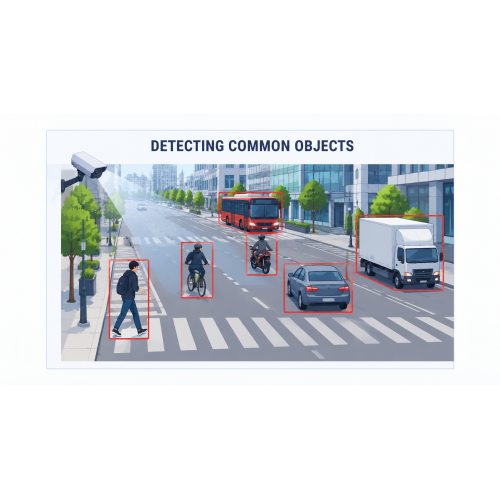
The agent analyses every camera stream in real time, marks what it finds on the live view, captures a snapshot of the moment and raises the alarm. It recognises six classes of object — the ones that actually matter for security:
- Person — day or night, walking, standing or crouching.
- Bicycle
- Motorcycle
- Car
- Bus
- Truck
Because people and vehicles are recognised separately, you can act differently on each: a person in the yard after closing is an alarm, a delivery truck at the gate at eight in the morning is not.
What your business gets out of it
- An intruder alarm from the cameras you already own. No beams, no PIR sensors, no wiring contractor — your existing IP cameras and an ordinary PC become a detection system that tells you what it saw, not just that something moved.
- The end of motion-detection false alarms. Classic motion triggers fire on rain, branches, headlights, insects on the lens and a cat crossing the yard. This agent alarms on a person or a vehicle, so the notifications your team receives are worth opening.
- Nobody has to watch a screen. Overnight, at weekends, on unmanned sites, the agent is the one watching. A push notification with the snapshot reaches the manager's phone in seconds, so the decision to call the police or the key-holder is made from a picture rather than a guess.
- Perimeters and restricted areas, properly covered. Draw the zones that matter — a fence line, a loading bay, a stock room, a staff-only corridor — and be told when a person or a vehicle enters them, rather than trawling the recording afterwards.
- More than security. The same detections tell you how vehicles use a yard or a car park and when foot traffic peaks — useful for staffing, access control and site planning.
- Evidence when you need it. Every event is stored in a searchable history with its image, timestamp and camera — ready for a police report, an insurance claim or an internal review.
- Your footage stays yours. All processing happens on your premises. No video of your staff, customers or visitors is uploaded to a third-party cloud, which keeps you on the right side of GDPR.
How you control it
Enable the agent per camera, and choose which classes each camera alarms on — people only at the back gate, vehicles only at the entrance barrier. Restrict it to zones you draw on the live view, and combine it with virtual barrier lines for perimeter alerts. Set the hours it applies — for example people-detection only after closing time. Tune sensitivity and scan frequency per camera to balance responsiveness against CPU load. The GuardNet mobile app for iOS and Android gives you live views, the alarm history and remote control from anywhere.
Who it is for
Warehouses, yards and depots — perimeters, gates and loading bays, where an
out-of-hours person or vehicle is the whole alarm.
Retail and offices — after-hours cover for shop floors, stock rooms and
receptions, plus footfall insight during the day.
Car parks and forecourts — vehicle movement, restricted bays and barrier
approaches, told apart from people on foot.
Remote and unmanned sites — construction sites, rural properties and substations,
running on a small low-power edge device with alerts going straight to the phone.
Any business that owns cameras but only ever looks at them the morning after
something happened.
Tags: Common agent